Welcome to Doom9's Forum, THE in-place to be for everyone interested in DVD conversion.

Before you start posting please read the forum rules. By posting to this forum you agree to abide by the rules.

Domains: forum.doom9.org / forum.doom9.net / forum.doom9.se


Go Back   Doom9's Forum > Capturing and Editing Video > New and alternative a/v containers
Register FAQ Today's Posts Search

Closed Thread
 
Thread Tools Search this Thread
Old 4th July 2015, 16:45   #3421  |  Link
Mosu
MKVToolNix author
 
Mosu's Avatar
 
Join Date: Sep 2002
Location: Braunschweig, Germany
Posts: 4,352
You're quite welcome
__________________
Latest MKVToolNix is v101.0

If I ever ask you to upload something, please use my file server.
Mosu is offline  
Old 4th July 2015, 17:15   #3422  |  Link
73ChargerFan
Registered User
 
73ChargerFan's Avatar
 
Join Date: Dec 2006
Posts: 507
Quote:
Originally Posted by Mosu View Post
The chapter editor will be fun, too, as I have to think about useful key bindings for »move level up/down«, too, not just »move up/down on the same level«.
Does QT differentiate between "UpArrow" and "SHIFT+UpArrow" key presses?

If so, then the SHIFT key could be a modifier from a commonly used command (e.g. "UpArrow" = move line up in same level) to a closely related, less frequently used command ("SHIFT+UpArrow" = move entire level up.)

A similar example would be in a text editor, where "UpArrow" = move cursor up a line, while "SHIFT+UpArrow" = move cursor up a paragraph.

Trying to be helpful.
73ChargerFan is offline  
Old 4th July 2015, 17:25   #3423  |  Link
Mosu
MKVToolNix author
 
Mosu's Avatar
 
Join Date: Sep 2002
Location: Braunschweig, Germany
Posts: 4,352
Yes, it does, but Shift+Arrows is already used for shrinking/expanding in a select (applies to the files/tracks/attachments lists, but not the chapter editor, however, I won't use the same basic key bindings for different functionality within my GUI).

I'm currently thinking about Ctrl+Up/Down for moving up/down on the same level, Ctrl+Left for »move one level up« (in direction of the root) and Ctrl+Right for »move one level down« (away from the root). Using left/right is similar to a basic tree view functionality: expanding the current item (right arrow) and collapsing it (left arrow).
__________________
Latest MKVToolNix is v101.0

If I ever ask you to upload something, please use my file server.
Mosu is offline  
Old 4th July 2015, 17:35   #3424  |  Link
73ChargerFan
Registered User
 
73ChargerFan's Avatar
 
Join Date: Dec 2006
Posts: 507
Yeah, I forgot the Windows convention of using shift & ctrl expand selections.
73ChargerFan is offline  
Old 5th July 2015, 01:57   #3425  |  Link
ndjamena
Registered User
 
Join Date: Sep 2012
Posts: 366
Quote:
Originally Posted by hubblec4 View Post
Such explanaitons are confuse me :-)


The first child node is hidden and a second not...mmh i dont understand.

I think LAV Splitter is the new standard for mkv. A hidden chapter will not shown but all the nested chapters.
Disabled chapters will be ignored and not shown (include all nested chapters).


Mosu: Who was that one doing the chapter specs?
https://forum.videolan.org/viewtopic.php?f=2&t=118984

Quote:
The Specs look like they were written by the village idiot
That's my take on the whole Matroska situation. I've tried my hand at Tags, I've tried writing a chapter editor. It seems no matter where I look in the Matroska world it always comes to a grinding halt, and the fact that I'm running into other people who are having the same problems as me is the only evidence I have that's it's not entirely my fault. I was hoping at first that you knew what you were doing and had some insider information the rest of us didn't have, but then I did some reading and found out where that info of yours was coming from.

https://forum.videolan.org/viewtopic.php?f=14&t=124278

I still haven't figured out how "gaps" work exactly, but I re-ripped the DVD I was having problems with using MakeMKV again and ran it through some tests.

https://github.com/mbunkus/mkvtoolnix/issues/1104

MKVMerge still splits it properly. And since Lhomme did some tinkering in VLCs inner workings the nightly no longer goes skitzo when it finds the end of the stream (or a gap or whatever).

I'm kind of hoping somewhere out of my program group (VLC, MakeMKV, MKVToolNix) exists people who actually know how the Matroska works... it's not MediaPortal, I know that.

Mosu has been telling me to ask Lhomme how everything actually works, so I did, and got no answer. So I think it's best if people just don't fiddle with these kind of things until the Specs have been brought up to... specs.

I've been looking half-heartedly through the specs for the part where it specifically mentions unknown elements should be skipped... I haven't found it yet, I can see where it could be implied though...


http://www.matroska.org/technical/specs/notes.html
Quote:
Beginning of File

An EBML file always starts with 0x1A. The 0x1A makes the DOS command "type" ends display. That way you can include ASCII text before the EBML data and it can be displayed. The EBML parser is safe from false-alarm with these ASCII only codes.

Next the EBML header is stored. This allows the the parser to know what type of EBML file it is parsing.
I've been trying to figure out why it mentions this and what it's trying to say exactly. I've tried adding text to the beginning of a MKV using a hex editor and not even MKVMerge could read the bloody thing ('type' worked nicely though).
ndjamena is offline  
Old 5th July 2015, 11:52   #3426  |  Link
hubblec4
Matroska find' ich toll
 
Join Date: Apr 2008
Posts: 1,413
Quote:
Originally Posted by ndjamena View Post
... I was hoping at first that you knew what you were doing and had some insider information the rest of us didn't have, but then I did some reading and found out where that info of yours was coming from.
All my information I have collected in the last time be useless, because no AV-Splitter can handle the full of mkv-properties.
LAV is atm the best way but far away from that what Matroska can do.
I'm sure its not a problem for me to build Menu.xml chapter files like DVDMenuExtractor or other nice things (like Track-selection).

We must live with that what others do for us.

Mosu is my hero and its nice to know, that he work continuously on MKVToolNix.
hubblec4 is offline  
Old 5th July 2015, 12:05   #3427  |  Link
ndjamena
Registered User
 
Join Date: Sep 2012
Posts: 366
MKVToolNix is the best thing about Matroska.

And VC-1 and PGS, but PGS is MakeMKVs doing, so I guess MakeMKV goes on the list too.
ndjamena is offline  
Old 8th July 2015, 16:06   #3428  |  Link
bartonnen
Registered User
 
Join Date: Nov 2014
Posts: 15
I noticed an issue with 8.1 - if I drag an mkv into the "edit chapters" screen and alter some chapter names, none of the three save options on the menu are available. If I then click on another page and back to "edit chapters" again, the save options are now available. Same thing happens when using the open option from the menu.

The save options should be available as soon as a file is dragged in or opened.
bartonnen is offline  
Old 8th July 2015, 16:37   #3429  |  Link
Mosu
MKVToolNix author
 
Mosu's Avatar
 
Join Date: Sep 2002
Location: Braunschweig, Germany
Posts: 4,352
Thanks for reporting. That's a known issue that's already been fixed.
__________________
Latest MKVToolNix is v101.0

If I ever ask you to upload something, please use my file server.
Mosu is offline  
Old 18th July 2015, 18:22   #3430  |  Link
Mosu
MKVToolNix author
 
Mosu's Avatar
 
Join Date: Sep 2002
Location: Braunschweig, Germany
Posts: 4,352
MKVToolNix v8.2.0

Hey,

I've released MKVToolNix v8.2.0. This is another release implementing a lot of enhancements and new features for MKVToolNix GUI. Nearly all of them are a direct result of all the feedback received for versions 8.0.0 and 8.1.0. Therefore I urge you to upgrade, especially if you're still using 8.0.0.

The old GUI (mkvmerge GUI) is still included and scheduled to be removed after 8.3.0.

Changes for package maintainers: nothing's changed since v8.1.0.

Here are the usual links: the MKVToolNix home page, the Windows installer and portable version and the source code.

All binaries that I provide have been uploaded already.

Here's the full ChangeLog since the previous release:

Quote:
2015-07-18 Moritz Bunkus <moritz@bunkus.org>
* Released v8.2.0.
* mkvmerge, MKVToolNix GUI: bug fix: fixed the container type not being recognized properly by the GUI. Now the numerical container type ID is output in verbose identification mode by mkvmerge.
* MKVToolNix GUI: chapter editor enhancement: the template for chapter names can now contain a number of places for the chapter number, e.g. '<NUM:3>'. The number will be zero-padded if there are less places than specified.
* MKVToolNix GUI: new chapter editor feature: implemented a function for renumbering chapters. This allows the user to automatically assign new chapter names to one level of sub-chapters with ascending numbers. Implements #1355.

2015-07-15 Moritz Bunkus <moritz@bunkus.org>
* MKVToolNix GUI: new feature: the position of the tab headers of all tab widgets can be changed in the preferences. Implements #1334.

2015-07-12 Moritz Bunkus <moritz@bunkus.org>
* MKVToolNix GUI: new feature: added an option for hiding the tool selector.
* MKVToolNix GUI: new job queue feature: added menu options for stopping the queue either immediately or after the current job has finished. Implements #1303.
* MKVToolNix GUI: new job queue feature: added a context menu option for setting jobs to status »pending manual start«.

2015-07-11 Moritz Bunkus <moritz@bunkus.org>
* MKVToolNix GUI: chapter editor bug fix: the file is not kept open so that you can open it in other applications at the same time.
* MKVToolNix GUI: new merge tool feature: added context menu options for selecting all tracks of a specific type (e.g. all audio tracks). Implements #1197.
* MKVToolNix GUI: merge tool enhancement: the dialog shown after dragging & dropping files from external applications asking if those files should be added or appended now has an option to always add and never to show that dialog again. For new MKVToolNix installations the default is now to show this dialog again until the user deactivates it either in the dialog or in the preferences.
* MKVToolNix GUI: new feature: added additional ways to move selected files, tracks and attachments around: keyboard shortcuts (Ctrl+Up and Ctrl+Down) and optional buttons (those have to be enabled in the preferences). Using drag & drop remains possible. Implements #1279.

2015-07-05 Moritz Bunkus <moritz@bunkus.org>
* MKVToolNix GUI: bug fix: if a GUI language other than English was selected then the warning/error messages output by mkvmerge were not recognized properly and output in the wrong text views.
* MKVToolNix GUI: merge tool bug fix: fixed loading saved settings in which an appended file contains chapters/tags/attachments.

2015-07-04 Moritz Bunkus <moritz@bunkus.org>
* MKVToolNix GUI: new merge tool feature: dragging files from external applications now allows you to create new mux settings and add the dropped files to those if the »always add dropped files« option is off. Implements #1297.
* MKVToolNix GUI: new feature: added support for displaying the queue progress on the task bar button. Implements #1335.
* mkvmerge: bug fix: fixed handling of MPEG transport streams where all PATs and PMTs have CRC errors. Fixes #1336.
* MKVToolNix GUI: new merge tool feature: implemented support for re-ordering new attachments via drag & drop. Implements #1276.

2015-07-03 Moritz Bunkus <moritz@bunkus.org>
* MKVToolNix GUI: bug fix: fixed the command line option used when the »fix bitstream timing info« check box is checked. Fixes #1337.

2015-07-01 Moritz Bunkus <moritz@bunkus.org>
* docs: added a Spanish translation of the man pages by Israel Lucas Torrijos (see AUTHORS).
* MKVToolNix GUI: enhancement: several drop down boxes have had their options renamed slightly to be more consistent overall and easier to select via the keyboard. Implements #1309.
* MKVToolNix GUI: fix compilation with the upcoming Qt 5.5.0. Fixes #1328.

2015-06-30 Moritz Bunkus <moritz@bunkus.org>
* MKVToolNix GUI: job queue bug fix: when re-starting a job the »date finished« field wasn't reset. Fixes #1323.
* MKVToolNix GUI: merge tool bug fix: the option »set output file name relative to first input file« caused the relative path to be applied each time a file was added resulting in the wrong directory. Fixes #1321.
* MKVToolNix GUI: merge tool bug fix: when adding a Blu-ray playlist and aborting the »select playlist to add« dialog the originally opened playlist was added even so.
* mkvmerge: bug fix: the MPEG-1/2 video code was causing an illegal memory access under certain conditions. Fixes #1217 and #1278.

2015-06-29 Moritz Bunkus <moritz@bunkus.org>
* MKVToolNix GUI: bug fix: the »default subtitle character set« combo box required a selection without an option for using the system's default. An entry »– no selection by default –« has been added at the top.
* MKVToolNix GUI: bug fix: fixed parsing command line arguments to an already-running instance on Windows. Fixes #1322.

2015-06-28 Moritz Bunkus <moritz@bunkus.org>
* MKVToolNix GUI: enhancement: position and size of the several additional windows are saved and restored. These include: the preferences window, the dialog for additional command line options, the dialog showing the command line and the dialog for selecting the playlist to add. Implements #1317.
* MKVToolNix GUI: bug fix: fixed the combo boxes with languages, countries and character sets not being re-initialized after changes to the list of common languages/countries/character sets in the preferences. Fixes #1224.
* MKVToolNix GUI: enhancement: the relative sizes of all splitters are saved and restored. Implements #1306.
* MKVToolNix GUI: chapter editor bug fix: fixed the menu entries »save to XML file« and »save to Matroska file« not being available after loading chapters until the tool or tab was changed. Fixes #1312.
* MKVToolNix GUI: bug fix: fixed labels and therefore the window becoming excessively wide with long file names. Fixes #1314.
* MKVToolNix GUI: merge tool bug fix: fixed the focus marker around combo boxes inside scroll areas not being drawn. Fixes #1310.
* MKVToolNix GUI: merge tool bug fix: fixed the stereoscopy mode being off by one. Fixes #1311.
* MKVToolNix GUI: merge tool bug fix: fixed the --append-to calculation if more than one file has been appended. Fixes #1313.
Have fun.
__________________
Latest MKVToolNix is v101.0

If I ever ask you to upload something, please use my file server.
Mosu is offline  
Old 18th July 2015, 19:05   #3431  |  Link
Keiyakusha
契約者
 
Keiyakusha's Avatar
 
Join Date: Jun 2008
Posts: 1,506
Hi Mosu. Unfortunately for me this version still has that 10-sec-delay-before-action issue. Do you have any tips as to what can I check/fix or something? Could it be some leftovers from old beta versions that are interfering? Old GUI is lightning-fast as always. Edit: win7 x64, x64 MKVtoolnix

Last edited by Keiyakusha; 18th July 2015 at 19:08.
Keiyakusha is offline  
Old 18th July 2015, 19:43   #3432  |  Link
ndjamena
Registered User
 
Join Date: Sep 2012
Posts: 366
Quote:
* mkvmerge: bug fix: the MPEG-1/2 video code was causing an illegal memory access under certain conditions. Fixes #1217 and #1278.
Wow, there's been a bug in the m2v reading code since 7.4.0 that only shows itself in random situations, it's odd that no one tried to report that the moment 7.4.0 was released.

On an unrelated note, I really need to figure out how to get access to a second computer...
ndjamena is offline  
Old 19th July 2015, 14:45   #3433  |  Link
Mosu
MKVToolNix author
 
Mosu's Avatar
 
Join Date: Sep 2002
Location: Braunschweig, Germany
Posts: 4,352
Quote:
Originally Posted by Keiyakusha View Post
Hi Mosu. Unfortunately for me this version still has that 10-sec-delay-before-action issue. Do you have any tips as to what can I check/fix or something? Could it be some leftovers from old beta versions that are interfering? Old GUI is lightning-fast as always. Edit: win7 x64, x64 MKVtoolnix
Unfortunately I don't have an idea why it's doing it or what to do about it. Sorry.
__________________
Latest MKVToolNix is v101.0

If I ever ask you to upload something, please use my file server.
Mosu is offline  
Old 19th July 2015, 14:51   #3434  |  Link
Mosu
MKVToolNix author
 
Mosu's Avatar
 
Join Date: Sep 2002
Location: Braunschweig, Germany
Posts: 4,352
Quote:
Originally Posted by Keiyakusha View Post
Hi Mosu. Unfortunately for me this version still has that 10-sec-delay-before-action issue. Do you have any tips as to what can I check/fix or something? Could it be some leftovers from old beta versions that are interfering? Old GUI is lightning-fast as always. Edit: win7 x64, x64 MKVtoolnix
One thing you could try is to give the portable version a try if you're currently using the installed one and vice versa.
__________________
Latest MKVToolNix is v101.0

If I ever ask you to upload something, please use my file server.
Mosu is offline  
Old 19th July 2015, 16:52   #3435  |  Link
Keiyakusha
契約者
 
Keiyakusha's Avatar
 
Join Date: Jun 2008
Posts: 1,506
Quote:
Originally Posted by Mosu View Post
One thing you could try is to give the portable version a try if you're currently using the installed one and vice versa.
I usually prefer portable versions of the software but with MKVtoolnix I somehow ended up using installer all the time. But anyway, you are right. Portable version does not have this issue for me. I'll just use it from now on.
Keiyakusha is offline  
Old 19th July 2015, 19:04   #3436  |  Link
Mosu
MKVToolNix author
 
Mosu's Avatar
 
Join Date: Sep 2002
Location: Braunschweig, Germany
Posts: 4,352
Uhm… the portable works nicely and the installed one has those delays!? Wow, that's interesting. The only difference between those two is how the settings are stored: in an .ini for the portable one and in the registry for the installed version (same code in both cases, which code path is used is determined by the presence or absence of the file data\portable-app).

Do you still have the registry settings from the installed version? They're stored as HKEY_CURRENT_USER\Software\bunkus.org. If so, can you please export that sub-tree and send it to me to moritz@bunkus.org? Thanks.
__________________
Latest MKVToolNix is v101.0

If I ever ask you to upload something, please use my file server.
Mosu is offline  
Old 20th July 2015, 07:07   #3437  |  Link
TheBean
Registered User
 
Join Date: Feb 2015
Posts: 3
Is it possible to disable the generation of global tags / track tags with the new GUI? I'm still using 7.9.0 because I like to have them disabled with the command line and can't figure out how to do it with 8.2.0.
TheBean is offline  
Old 20th July 2015, 07:28   #3438  |  Link
Mosu
MKVToolNix author
 
Mosu's Avatar
 
Join Date: Sep 2002
Location: Braunschweig, Germany
Posts: 4,352
Sure it can. On the merge tool go to the »output« tab. On the lower right you'll see »additional options«. Either enter the option manually or hit the button to the right of it which will open a dialog showing all available additional options. In that dialog you can also opt to have the selected options be set for each new merge job by default.

You can find the same default options in the preferences dialog on the »merging« tab. Here it's called »Default additional command line options« with the same button and the same dialog attached to it.
__________________
Latest MKVToolNix is v101.0

If I ever ask you to upload something, please use my file server.
Mosu is offline  
Old 20th July 2015, 16:32   #3439  |  Link
NanoBot
Registered User
 
Join Date: Sep 2003
Posts: 204
Hi Mosu, hi everybody,

I would like to suggest a small cosmetic change concerning the import of chapter files:

The file requester by default offers the ".xml" file extension for xml-based chapter files, but it does not offer the ".txt" or ".ogg" file extension for text-based chapter files. Of course it is possible to change the extension filter from ".xml chapter files" to "all files", but I would suggest to change the default file extension to ".xml, .ogg, .txt", which would allow to import both xml- and text-based chapter files without changing the file extension filter to "all files".

C.U. NanoBot
NanoBot is offline  
Old 20th July 2015, 18:43   #3440  |  Link
Mosu
MKVToolNix author
 
Mosu's Avatar
 
Join Date: Sep 2002
Location: Braunschweig, Germany
Posts: 4,352
Well… someone else has reported such a thing in the past, but I haven't been able to reproduce this. For me the file type filter lists a lot more options, and it defaults to »all supported file types«. See here:
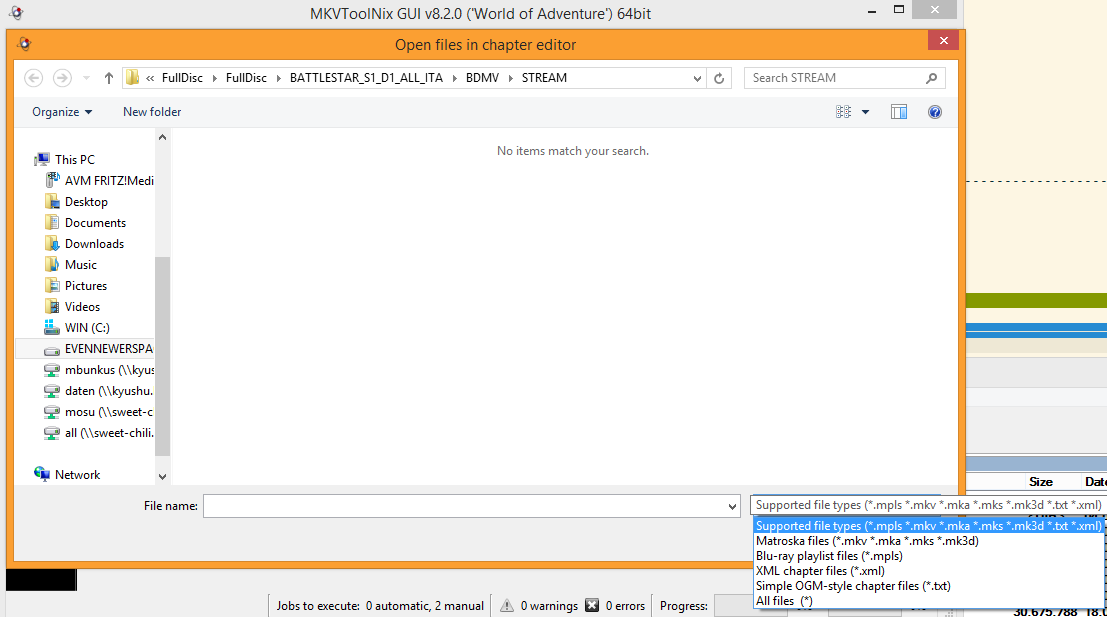


Same on Linux:
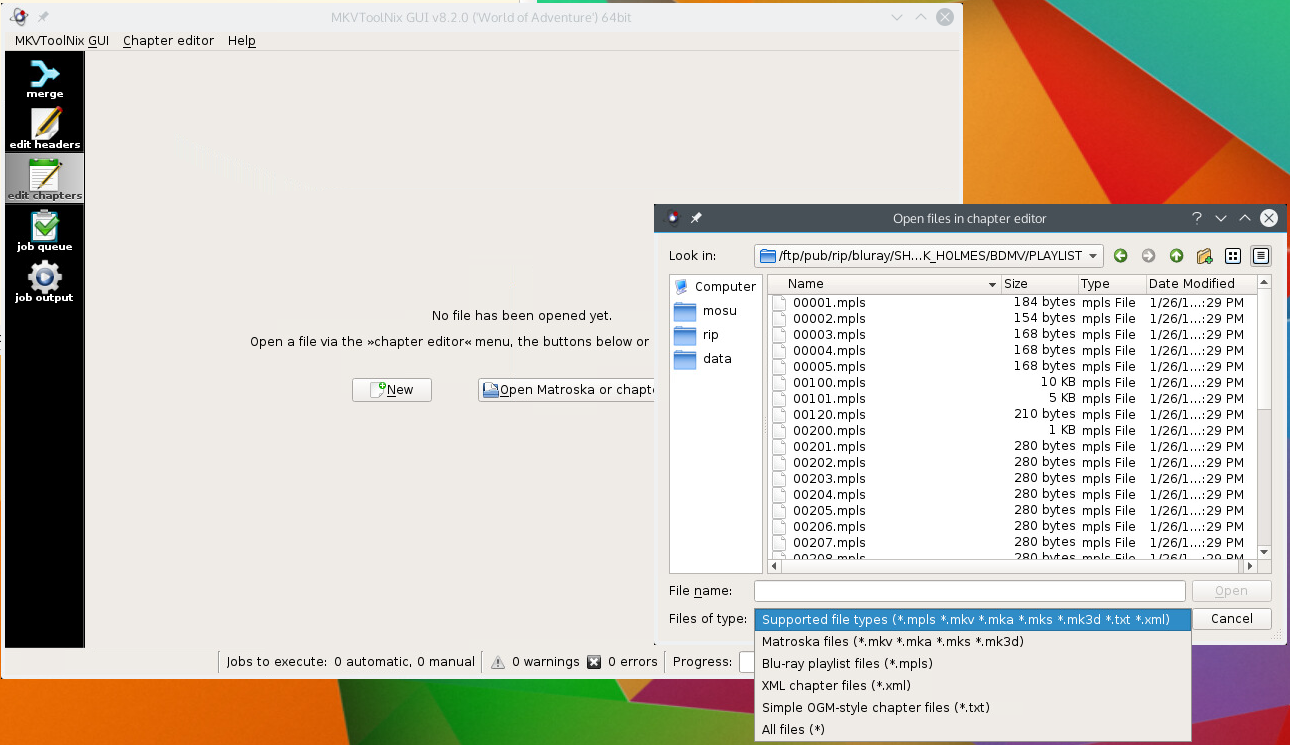


Which operating system are you using? Which version of MKVToolNix GUI? Which translation are you using?
__________________
Latest MKVToolNix is v101.0

If I ever ask you to upload something, please use my file server.
Mosu is offline  
Closed Thread


Posting Rules
You may not post new threads
You may not post replies
You may not post attachments
You may not edit your posts

BB code is On
Smilies are On
[IMG] code is On
HTML code is Off

Forum Jump


All times are GMT +1. The time now is 19:09.


Powered by vBulletin® Version 3.8.11
Copyright ©2000 - 2026, vBulletin Solutions Inc.