Welcome to Doom9's Forum, THE in-place to be for everyone interested in DVD conversion. Before you start posting please read the forum rules. By posting to this forum you agree to abide by the rules. Domains: forum.doom9.org / forum.doom9.net / forum.doom9.se |
 4th July 2015, 16:45
|
#3421 | Link |
|
MKVToolNix author

Join Date: Sep 2002
Location: Braunschweig, Germany
Posts: 4,352
|
You're quite welcome

__________________
Latest MKVToolNix is v101.0 If I ever ask you to upload something, please use my file server. |

|
|
4th July 2015, 17:15
|
#3422 | Link | |
|
Registered User

Join Date: Dec 2006
Posts: 507
|
Quote:
If so, then the SHIFT key could be a modifier from a commonly used command (e.g. "UpArrow" = move line up in same level) to a closely related, less frequently used command ("SHIFT+UpArrow" = move entire level up.) A similar example would be in a text editor, where "UpArrow" = move cursor up a line, while "SHIFT+UpArrow" = move cursor up a paragraph. Trying to be helpful.
|
|
|
|
|
4th July 2015, 17:25
|
#3423 | Link |
|
MKVToolNix author
Join Date: Sep 2002
Location: Braunschweig, Germany
Posts: 4,352
|
Yes, it does, but Shift+Arrows is already used for shrinking/expanding in a select (applies to the files/tracks/attachments lists, but not the chapter editor, however, I won't use the same basic key bindings for different functionality within my GUI).
I'm currently thinking about Ctrl+Up/Down for moving up/down on the same level, Ctrl+Left for »move one level up« (in direction of the root) and Ctrl+Right for »move one level down« (away from the root). Using left/right is similar to a basic tree view functionality: expanding the current item (right arrow) and collapsing it (left arrow).
__________________
Latest MKVToolNix is v101.0 If I ever ask you to upload something, please use my file server. |
|
|
|
5th July 2015, 01:57
|
#3425 | Link | |||
|
Registered User
Join Date: Sep 2012
Posts: 366
|
Quote:
Quote:
https://forum.videolan.org/viewtopic.php?f=14&t=124278 I still haven't figured out how "gaps" work exactly, but I re-ripped the DVD I was having problems with using MakeMKV again and ran it through some tests. https://github.com/mbunkus/mkvtoolnix/issues/1104 MKVMerge still splits it properly. And since Lhomme did some tinkering in VLCs inner workings the nightly no longer goes skitzo when it finds the end of the stream (or a gap or whatever). I'm kind of hoping somewhere out of my program group (VLC, MakeMKV, MKVToolNix) exists people who actually know how the Matroska works... it's not MediaPortal, I know that. Mosu has been telling me to ask Lhomme how everything actually works, so I did, and got no answer. So I think it's best if people just don't fiddle with these kind of things until the Specs have been brought up to... specs. I've been looking half-heartedly through the specs for the part where it specifically mentions unknown elements should be skipped... I haven't found it yet, I can see where it could be implied though... http://www.matroska.org/technical/specs/notes.html Quote:
|
|||
|
|
|
5th July 2015, 11:52
|
#3426 | Link | |
|
Matroska find' ich toll
Join Date: Apr 2008
Posts: 1,413
|
Quote:
LAV is atm the best way but far away from that what Matroska can do. I'm sure its not a problem for me to build Menu.xml chapter files like DVDMenuExtractor or other nice things (like Track-selection). We must live with that what others do for us. Mosu is my hero and its nice to know, that he work continuously on MKVToolNix. |
|
|
|
|
8th July 2015, 16:06
|
#3428 | Link |
|
Registered User
Join Date: Nov 2014
Posts: 15
|
I noticed an issue with 8.1 - if I drag an mkv into the "edit chapters" screen and alter some chapter names, none of the three save options on the menu are available. If I then click on another page and back to "edit chapters" again, the save options are now available. Same thing happens when using the open option from the menu.
The save options should be available as soon as a file is dragged in or opened. |
|
|
|
8th July 2015, 16:37
|
#3429 | Link |
|
MKVToolNix author
Join Date: Sep 2002
Location: Braunschweig, Germany
Posts: 4,352
|
Thanks for reporting. That's a known issue that's already been fixed.
__________________
Latest MKVToolNix is v101.0 If I ever ask you to upload something, please use my file server. |
|
|
|
18th July 2015, 18:22
|
#3430 | Link | |
|
MKVToolNix author
Join Date: Sep 2002
Location: Braunschweig, Germany
Posts: 4,352
|
MKVToolNix v8.2.0
Hey,
I've released MKVToolNix v8.2.0. This is another release implementing a lot of enhancements and new features for MKVToolNix GUI. Nearly all of them are a direct result of all the feedback received for versions 8.0.0 and 8.1.0. Therefore I urge you to upgrade, especially if you're still using 8.0.0. The old GUI (mkvmerge GUI) is still included and scheduled to be removed after 8.3.0. Changes for package maintainers: nothing's changed since v8.1.0. Here are the usual links: the MKVToolNix home page, the Windows installer and portable version and the source code. All binaries that I provide have been uploaded already. Here's the full ChangeLog since the previous release: Quote:
__________________
Latest MKVToolNix is v101.0 If I ever ask you to upload something, please use my file server. |
|
|
|
|
18th July 2015, 19:05
|
#3431 | Link |
|
契約者

Join Date: Jun 2008
Posts: 1,506
|
Hi Mosu. Unfortunately for me this version still has that 10-sec-delay-before-action issue. Do you have any tips as to what can I check/fix or something? Could it be some leftovers from old beta versions that are interfering? Old GUI is lightning-fast as always. Edit: win7 x64, x64 MKVtoolnix
Last edited by Keiyakusha; 18th July 2015 at 19:08. |
|
|
|
18th July 2015, 19:43
|
#3432 | Link | |
|
Registered User
Join Date: Sep 2012
Posts: 366
|
Quote:
On an unrelated note, I really need to figure out how to get access to a second computer... |
|
|
|
|
19th July 2015, 14:45
|
#3433 | Link | |
|
MKVToolNix author
Join Date: Sep 2002
Location: Braunschweig, Germany
Posts: 4,352
|
Quote:
__________________
Latest MKVToolNix is v101.0 If I ever ask you to upload something, please use my file server. |
|
|
|
|
19th July 2015, 14:51
|
#3434 | Link | |
|
MKVToolNix author
Join Date: Sep 2002
Location: Braunschweig, Germany
Posts: 4,352
|
Quote:
__________________
Latest MKVToolNix is v101.0 If I ever ask you to upload something, please use my file server. |
|
|
|
|
19th July 2015, 16:52
|
#3435 | Link | |
|
契約者
Join Date: Jun 2008
Posts: 1,506
|
Quote:

|
|
|
|
|
19th July 2015, 19:04
|
#3436 | Link |
|
MKVToolNix author
Join Date: Sep 2002
Location: Braunschweig, Germany
Posts: 4,352
|
Uhm… the portable works nicely and the installed one has those delays!? Wow, that's interesting. The only difference between those two is how the settings are stored: in an .ini for the portable one and in the registry for the installed version (same code in both cases, which code path is used is determined by the presence or absence of the file data\portable-app).
Do you still have the registry settings from the installed version? They're stored as HKEY_CURRENT_USER\Software\bunkus.org. If so, can you please export that sub-tree and send it to me to moritz@bunkus.org? Thanks.
__________________
Latest MKVToolNix is v101.0 If I ever ask you to upload something, please use my file server. |
|
|
|
20th July 2015, 07:28
|
#3438 | Link |
|
MKVToolNix author
Join Date: Sep 2002
Location: Braunschweig, Germany
Posts: 4,352
|
Sure it can. On the merge tool go to the »output« tab. On the lower right you'll see »additional options«. Either enter the option manually or hit the button to the right of it which will open a dialog showing all available additional options. In that dialog you can also opt to have the selected options be set for each new merge job by default.
You can find the same default options in the preferences dialog on the »merging« tab. Here it's called »Default additional command line options« with the same button and the same dialog attached to it.
__________________
Latest MKVToolNix is v101.0 If I ever ask you to upload something, please use my file server. |
|
|
|
20th July 2015, 16:32
|
#3439 | Link |
|
Registered User
Join Date: Sep 2003
Posts: 204
|
Hi Mosu, hi everybody,
I would like to suggest a small cosmetic change concerning the import of chapter files: The file requester by default offers the ".xml" file extension for xml-based chapter files, but it does not offer the ".txt" or ".ogg" file extension for text-based chapter files. Of course it is possible to change the extension filter from ".xml chapter files" to "all files", but I would suggest to change the default file extension to ".xml, .ogg, .txt", which would allow to import both xml- and text-based chapter files without changing the file extension filter to "all files". C.U. NanoBot |
|
|
|
20th July 2015, 18:43
|
#3440 | Link |
|
MKVToolNix author
Join Date: Sep 2002
Location: Braunschweig, Germany
Posts: 4,352
|
Well… someone else has reported such a thing in the past, but I haven't been able to reproduce this. For me the file type filter lists a lot more options, and it defaults to »all supported file types«. See here:
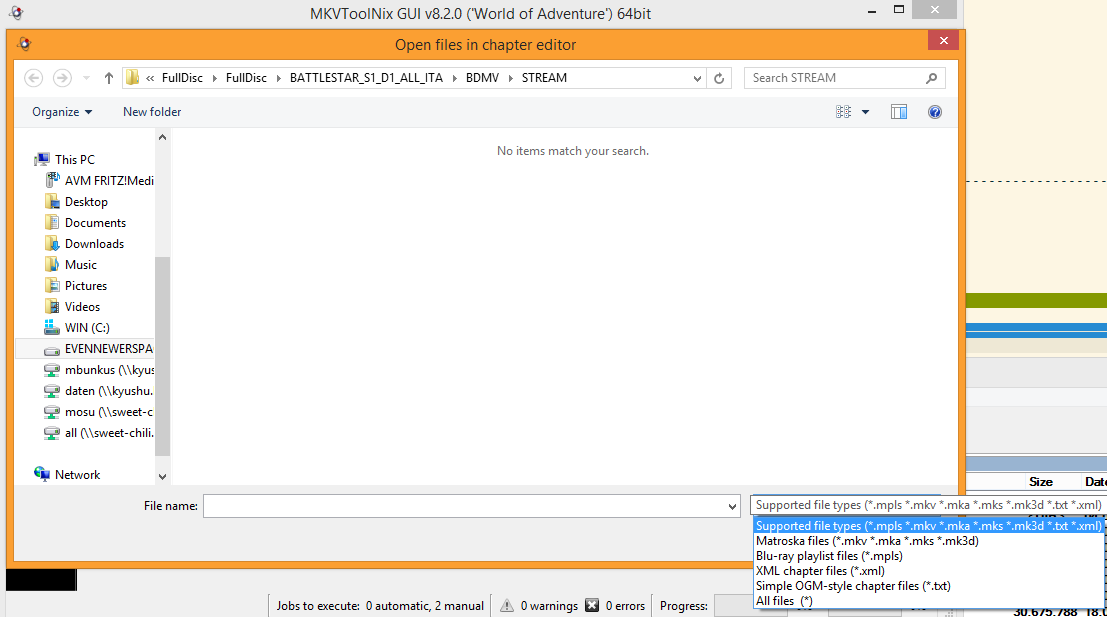 Same on Linux: 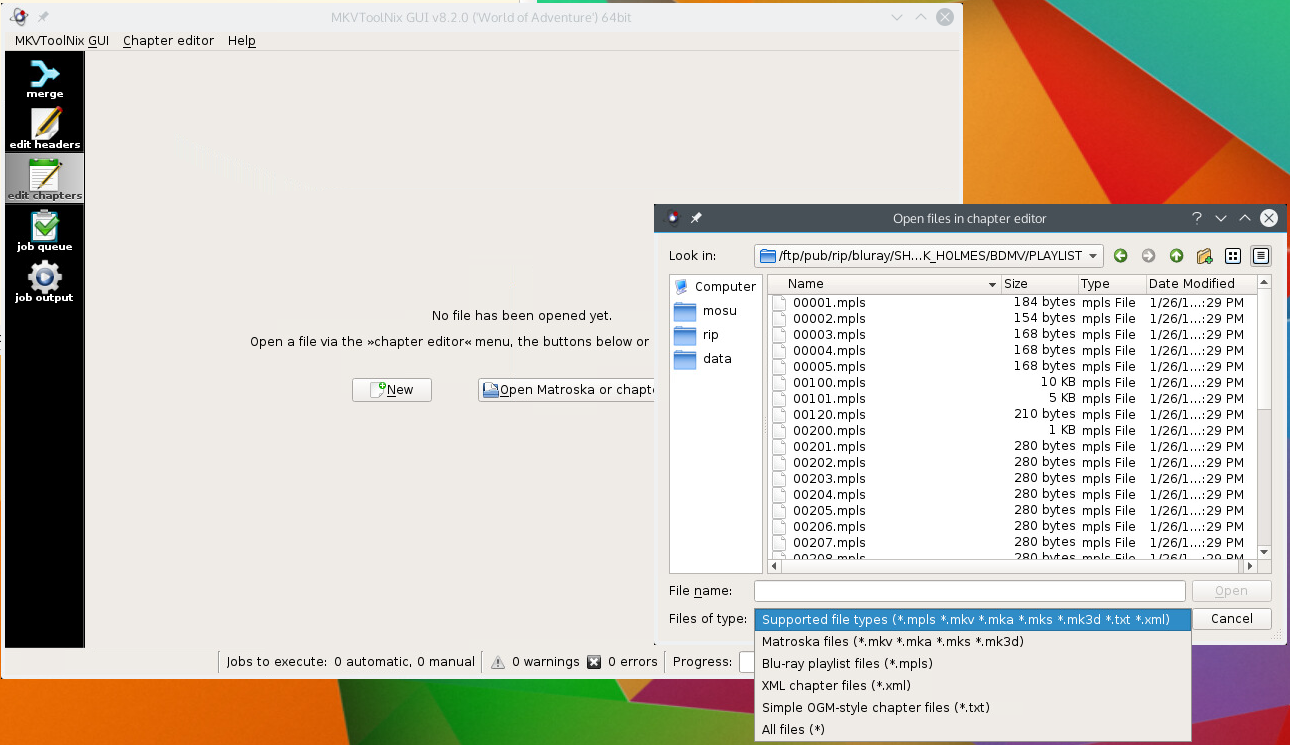 Which operating system are you using? Which version of MKVToolNix GUI? Which translation are you using?
__________________
Latest MKVToolNix is v101.0 If I ever ask you to upload something, please use my file server. |
|
|
 |
|
|


