Welcome to Doom9's Forum, THE in-place to be for everyone interested in DVD conversion. Before you start posting please read the forum rules. By posting to this forum you agree to abide by the rules. Domains: forum.doom9.org / forum.doom9.net / forum.doom9.se |
 1st November 2016, 23:23
|
#4383 | Link |
|
MKVToolNix author

Join Date: Sep 2002
Location: Braunschweig, Germany
Posts: 4,352
|
Thanks for the feedback!
__________________
Latest MKVToolNix is v101.0 If I ever ask you to upload something, please use my file server. |

|
|
5th November 2016, 14:48
|
#4385 | Link |
|
MKVToolNix author
Join Date: Sep 2002
Location: Braunschweig, Germany
Posts: 4,352
|
Earlier today the server was down for maintenance. It's up now.
__________________
Latest MKVToolNix is v101.0 If I ever ask you to upload something, please use my file server. |
|
|
|
15th November 2016, 05:05
|
#4386 | Link |
|
Registered User
Join Date: Oct 2013
Posts: 203
|
Unfortunately I am having an unusual problem here, and it's the first time ever this is happening. Since I can't provide the actual files here, I urge you to pay attention to all the details.
- These are all the tracks from the Matroska lossless extracted from the Blu-ray: http://pastebin.com/Bi96zcXP I did the following: - Added 2 SRT subtitle tracks; - Added another audio file, instructing MKVToolnix this: +750ms (delay). This was done because I noticed the dubbing was not synced with the video. - And I finally splitted the MKV into 3 parts. Each one with 14500 MB. Which resulted in 3 files, the first two with 14.1 and the 3rd 8.47 GB. This is how the 1st part looks like: http://pastebin.com/ytP1r1r2 My problem is this: when I add (option: append files, and this issue happens with all 3 combined or just the first two), in exactly the moment where (in the movie) we have a switch between parts (in the now unique file) the scene hangs from 40:46 to 40:50. Meaning that exactly at 40:46 it freezes, while the audio continues to be played, and advances to at least 40:48. What do I mean? It's like this: 1st part ends at 40:46. 2nd part continues from 40:46 onwards. 3rd part has, let's say, the final 10 minutes. When we append parts 1-2, this is what is happening: - Unique file with 28.3 GB and 1h20m. At 40:46, the bug occurs. Because this is the exact moment where the now unique file had the combination. I'll do another test here, this time removing the dubbing and its +750ms delay. But it can't be that what is causing all this. What is more strange is that I think that the unique file (without any splitting, the one I created before the actual splitting) wasn't plagued by this problem. So what changed when I did the splitting and rejoined the files? Can you make a guess what happened? |
|
|
|
15th November 2016, 09:22
|
#4387 | Link |
|
Registered User
Join Date: Dec 2002
Posts: 5,181
|
Is there a subtitle line in any of the two SRT files that extends from <=40:46 to 40:50? Mkvmerge cannot split such subtitles in the middle. It also has problems with splitting open gop H.264 but since keyframe interval should only be max 1 second on your BluRay it shouldn't result in a 4 second problem by itself.
Btw, usually --append-mode track is better suited to re-append previously split continuous files. https://mkvtoolnix.download/doc/mkvmerge.html#d4e760 Last edited by sneaker_ger; 15th November 2016 at 11:06. |
|
|
|
15th November 2016, 10:50
|
#4389 | Link |
|
Registered User
Join Date: Mar 2009
Location: Russian Crimea
Posts: 323
|
I am novice here and I want to ask some questions:
1. mkvtoolnix is one freeware application to split h265 without encoding now (as i.e. VideoReDo for h264) or I am wrong? 2. Is there possibility to cut h265 file from some time to the end of file without saving first part from beginning to that some time because I have a little free space on HDD? 3. Is possibility to do first frame of result (read my second question) I-frame in mkvtoolnix only? Or I have to know exactly time of I-frame in another application? What freeware can be proposed for that? |
|
|
|
15th November 2016, 11:11
|
#4390 | Link |
|
Registered User
Join Date: Dec 2002
Posts: 5,181
|
1. You mean "the only one"? No. For example ffmpeg.
2. "split by parts based on[...]" E.g. "00:05:03.200-". This saves everything from 5 minutes, 3 seconds, 200 ms to the end of the file. 3. Mkvmerge will split on the next following keyframe. You can't look this up using mkvmerge (no preview). You need another application to do that. https://mkvtoolnix.download/doc/mkvmerge.html#d4e760 |
|
|
|
15th November 2016, 11:51
|
#4391 | Link | |
|
Registered User
Join Date: Jul 2015
Posts: 989
|
Quote:
Splitter is currently only codec H264. Speech was that the frame "P" or "B" will have to be converted. Unfortunately, so when we have a long-GOP. How does it work in practice? When you want to get rid of "extra frames" we must be aware that the area of frames from the cut to the next frame I must be converted to lossy. -? Consequently, and whether it makes sense to cut short films? Not really, it is better to convert again. :idea: Easy to use, lossless video editor for AVC/H264, MP4, MOV, WEBM, FLV, MKV, MPEG-2, WMV, ASF, AVI frame-accurate trimming and joining. http://www.solveigmm.com/en/products/video-splitter/ 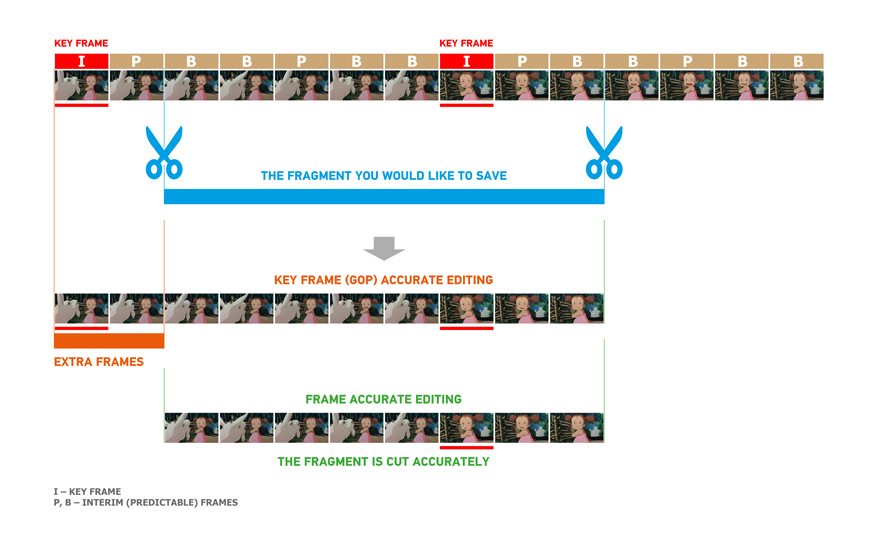
Last edited by Jamaika; 15th November 2016 at 12:09. |
|
|
|
|
15th November 2016, 12:47
|
#4392 | Link |
|
Matroska find' ich toll
Join Date: Apr 2008
Posts: 1,413
|
@ Perenista
Splitting is ever not so easy and simple. But it could be a problem of the video decoder. Sometimes I cut from Bluray series the middle part, and mux part 1 and part 3 together with a stuttering result. But I changed the video decoder from LAV-h264 to Microsoft DTV DVD video decoder and all works fine. |
|
|
|
15th November 2016, 14:07
|
#4393 | Link | |
|
Registered User
Join Date: Oct 2013
Posts: 203
|
Quote:
It's just that Google Drive offers only 15 GB of actual free disk space. So you have 2 options: 1) Either split into multiple files and then you can watch the whole thing, even if it's splitted; 2) You leave it as a unique file, but put it inside a RAR with 38 GB, also splitted, meaning each RAR will have 15 GB, but you wouldn't be able to watch any of it, obviously. Currently I watch all my movies with a PC/Hard Drive (or for some, a NAS) online, from my iPAD, so this isn't necessary. But I would like a watchable copy to exist in GD, also serving as a backup whenever I want to download to my HDD. What is odd about this case is that this only occurs when I append all the splitted files. I can only assume this is happening due to the excessive number of tracks or maybe it is entirely related wiith the delay inserted for the dubbing, since splittling and appending cannot have caused this. Don't you all said that everything MKVToolnix modifies cannot change the MKVs (meaning they will continue to be lossless)? I'll report later with more conclusions... Last edited by Perenista; 15th November 2016 at 14:09. |
|
|
|
|
15th November 2016, 14:13
|
#4394 | Link | ||
|
Registered User
Join Date: Dec 2002
Posts: 5,181
|
Quote:
Quote:
|
||
|
|
|
15th November 2016, 19:09
|
#4395 | Link | |
|
Registered User
Join Date: Oct 2013
Posts: 203
|
sneaker_ger, here's what I discovered so far:
1) The problem happens regardless of the dubbing added with its delay. So disregard that remark about adding 750ms. Let's not even mention this track anymore. 2) It can also occur when this option is used: http://forum.doom9.org/showthread.php?t=63956 By default, it's disabled. The option makes MPC-HC read as if it was a single file, instead of 3 splitted. But in my case, when I append all 3, the problem is still there. *************** In case you are wondering, this is what I was doing here. Let's call this movie "X1". The Blu-ray from "X1" has: - For the movie: - DTS-HD MA 5.1 - DTS 5.1 - DTS-HD MA 2.0 - DTS 2.0 Audio commentary #1 in DTS-HD MA 2.0 DTS 2.0 Audio commentary #2 in DTS-HD MA 2.0 DTS 2.0 Isolated Score in DTS-HD MA 2.0 DTS 2.0 Plus: English (CC) track for the movie. All these tracks from the BD. The video: Format : AVC Format/Info : Advanced Video Codec Format profile : High@L4.1 Format settings, CABAC : Yes Format settings, ReFrames : 4 frames Codec ID : V_MPEG4/ISO/AVC OK, so I have an unique file with all these 11 tracks (total), and more than 30 GB (besides "24 entries", which refer to chapters). Created by MakeMKV from the original BD. This MKV (lossless) is perfectly fine. What did I do next? - With MKVToolnix and this file open, I added: - A single subtitle (SRT) file, that covers the entire movie. This file is not splitted. English (normal) subtitles. - A second SRT (same condition as above), from another language (portuguese). Next thing I did was: Split mode: after output size: 14500M. Maximum number of files: Unlimited. And the box "Link files" unchecked. ********** After all 3 files were created, I opened the 1st (now preparing for Google Drive) and selected: append files, pointing to the 2nd file, then append: and selecting the 3rd. What happened after all that was what I reported here. In the exact moment we switch between parts in the now unique 30+ GB file, a "delay" of at least 2 seconds occurs, with that stuttering. Quote:
Meaning this is entirely MKVToolnix's fault. Even if there was a subtitle line that extended from one point to another, even if it extended from 40:46 to 1h, what difference does that make, since you are instructing the program to split anything, anyway? I'll do another test, this time including not 13, but 2 tracks. And leaving the rest outside the file. Considering that this issue never affected any movie I tried before, I believe it's due to the excessive number of tracks. |
|
|
|
|
15th November 2016, 19:23
|
#4396 | Link | |
|
Matroska find' ich toll
Join Date: Apr 2008
Posts: 1,413
|
Quote:
After muxing start the first part and all other parts should append automaticly by the player (MPC-HC). |
|
|
|
|
15th November 2016, 19:27
|
#4397 | Link | ||
|
Registered User
Join Date: Dec 2002
Posts: 5,181
|
Quote:
And: did you test other --append-mode like I suggested or did you not? Quote:
|
||
|
|
|
15th November 2016, 19:53
|
#4398 | Link |
|
Registered User
Join Date: Oct 2013
Posts: 203
|
OK, I tested now with only the DTS-HD MA 5.1 track and the BD subtitle. The issue is not happening again.
As for the SRT, this is what I see inside it (the english one): 00:40:40,274 --> 00:40:41,474 - Dialogue 00:40:44,445 --> 00:40:46,765 - Dialogue 00:40:48,325 --> 00:40:49,725 - Dialogue 00:40:51,452 --> 00:40:54,332 - Dialogue And the 2nd SRT (in portuguese): 00:40:41,748 --> 00:40:44,615 - Dialogue 00:40:45,652 --> 00:40:47,677 - Dialogue 00:40:48,622 --> 00:40:52,524 - Dialogue My point is that I never had to worry about any of this. I just did all the procedure described here and uploaded to GB. So what you are saying is that the subtitle itself caused the stuttering? I had to add it because in GD I can make use of a splitted SRT (and it has to be SRT), too, and I used MKVToolnix to do this job of splitting into 3 parts, then MKVExtractGUI2 to collect the SRTs from all 3 files, to be embedded in each part in GD. Can I assume this stuttering won't even occur if the SRT isn't there, even after I split and try to append the files? If that's the case then it's OK. This (according to you) is what happened: 1) - Unique file. 1.1) - Added SRTs mentioned above. 2) - Divided into 3 parts with those two SRTs. 3) - Appending all 3 parts into an unique file like 1) = stuttering caused by the SRT. The solution being creating an unique file again, and only after that adding both SRTs. Last edited by Perenista; 15th November 2016 at 19:56. |
|
|
|
15th November 2016, 19:59
|
#4399 | Link |
|
Registered User
Join Date: Dec 2002
Posts: 5,181
|
One potential solution. Other potential solutions:
1.) choose split point not in the middle of a subtitle 2.) use different --append-mode But I'm not 100% sure it's the cause. You can extract the SRTs after the split and see exactly how mkvmerge split them. And you can see how long the video and audio tracks are (mkvinfo). Then compare the lengths. |
|
|
|
15th November 2016, 21:25
|
#4400 | Link | |
|
Registered User
Join Date: Oct 2013
Posts: 203
|
Quote:
 I splitted and rejoined the 3 parts, except that now I left them out. And I even included the dubbing with the 750ms delay. It had nothing to do with the number of tracks. And I used the append option to create the unique file. Last edited by Perenista; 15th November 2016 at 21:27. |
|
|
|
 |
|
|


