Welcome to Doom9's Forum, THE in-place to be for everyone interested in DVD conversion. Before you start posting please read the forum rules. By posting to this forum you agree to abide by the rules. Domains: forum.doom9.org / forum.doom9.net / forum.doom9.se |
 16th August 2015, 04:52
|
#3521 | Link |
|
Registered User
Join Date: Dec 2010
Posts: 31
|
So far, a great deal of nice improvements to the new GUI, especially storing each job in a separate file, thank you for all your hard work.
 I do have 2 questions about the .mtxcfg format & jobQueue. -Is it possible to generate better filenames in the jobQueue, instead of what seems like a mix of random letters & numbers? -Will it ever be just as easy to mass edit .mtxcfg files as it is the older .mmg files with a text editor (eg. Notepad++) ? The .mtxcfg is hard to make heads or tails out of, and mass editing 20+ TV series jobs is still much easier with the .mmg format. Hopefully I didn't put a damper on your new release, since it's really starting to take shape.
|

|
|
16th August 2015, 07:14
|
#3522 | Link | ||||
|
MKVToolNix author

Join Date: Sep 2002
Location: Braunschweig, Germany
Posts: 4,352
|
Hey,
Quote:
Quote:
I don't have any plans on changing that schema as I don't see a compelling reason. If you want to manually add your own jobs to the queue without the GUI and you're worried about having to name the files in a similar way: don't be. The GUI should pick up all files in the jobQueue directory whose extension is ».mtxcfg« and assign a GUID automatically. Knowing that do you still want the GUI to use different a file naming scheme? If so what are the reasons? Quote:
I consider JSON to be a good choice. There are bindings for parsing and writing JSON available in pretty much each and every programming language. Modifying those files should be very, very easy. Quote:
 The internal format won't change, sorry, you should get used to it if you want to fiddle around with it. hubblec4 generates his own .mtxcfgs, too. Here are a couple of points I've explained to him a while ago:
__________________
Latest MKVToolNix is v101.0 If I ever ask you to upload something, please use my file server. |
||||
|
|
|
16th August 2015, 12:00
|
#3523 | Link | |
|
Matroska find' ich toll
Join Date: Apr 2008
Posts: 1,413
|
Quote:
Create one mmg manually, and all other episodes by copy/paste(replace) the paths in the mmg. @Mosu puuhhh the new format JSON looks like not so well for me. There is only one line in the mtxcfg. But the old mtxcfg will supported in future? So I can use this? |
|
|
|
|
16th August 2015, 12:55
|
#3524 | Link |
|
Matroska find' ich toll
Join Date: Apr 2008
Posts: 1,413
|
The new JSON mtxcfg seems to be easier.
When path's contains "ä , ö , ü ..etc" the format will not changed like in the old mtxcfg (ä = \xe4). Now its very easy to change mass mtxcfg's with an editor. I will change to JSON too. |
|
|
|
16th August 2015, 13:12
|
#3525 | Link |
|
MKVToolNix author
Join Date: Sep 2002
Location: Braunschweig, Germany
Posts: 4,352
|
Like I said: set that environment variable and the GUI will write nicely formatted JSON. It can always read both the compact and the indented variants.
__________________
Latest MKVToolNix is v101.0 If I ever ask you to upload something, please use my file server. |
|
|
|
16th August 2015, 17:13
|
#3526 | Link |
|
Registered User

Join Date: Jun 2013
Posts: 69
|
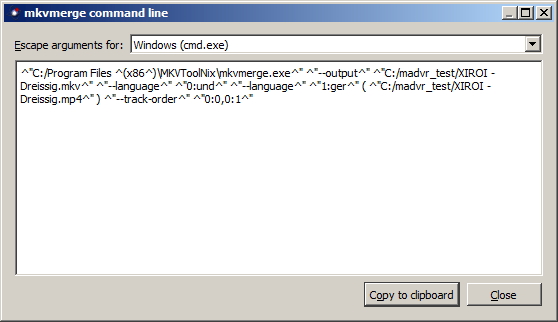
Mosu, any estimate on when the command line stuff will be complete in the new UI? Also, I noticed the current Windows cmd.exe is escaping the double quotes, i.e., ^" but they don't need to be escaped, however, the parans do, i.e., ^( and ^). Thank you.
BTW, I copied the current command line and tried to run it manually and received an error. Obviously if CLI not ready you can ignore this. Code:
"mkvmerge.exe" "--output" "title.mkv" "--language" "0:und" ( "sourceTitle.mkv" ) "--language" "0:und"
( "sourceTitle.ac3" ) "--language" "0:und" ( "sourceTitle.sup" ) "--chapters" "sourceTitle_chapters.txt"
"--engage" "no_cue_duration" "--engage" "no_cue_relative_position" "--track-order" "0:0,1:0,2:0")
mkvmerge v8.3.0 ('Over the Horizon') 64bit
Error: '0)' is not a valid file ID in '--track-order 0:0,1:0,2:0)'.
|
|
|
|
16th August 2015, 17:24
|
#3527 | Link |
|
MKVToolNix author
Join Date: Sep 2002
Location: Braunschweig, Germany
Posts: 4,352
|
The command line handling is ready: Merge → Show command line. The quoting is intentional. It may look ugly, but it actually is the only proper way to escape for cmd.exe.
What you think you know about escaping for cmd.exe is most likely incorrect or at least incomplete. See this informative but frightening blog post from a Microsoft employee. BTW: I'm sorry to say but cmd.exe stinks. Especially if one is used to sane shells like zsh or bash. And what do you mean – you »copied the current command line«? You definitely copied one closing parenthesis too much, I have no idea where you got that one from.
__________________
Latest MKVToolNix is v101.0 If I ever ask you to upload something, please use my file server. Last edited by Mosu; 16th August 2015 at 17:26. |
|
|
|
16th August 2015, 18:40
|
#3528 | Link |
|
Registered User
Join Date: Jun 2013
Posts: 69
|
I copied the command line string from the UI from the same location you mention, i.e., Merge > Show command line. I didn't notice that it had an extra paran on the end so good catch.
Regarding the escaping, yes, I just realized that it's fine the way it is since it's meant to be copied and executed on the command line directly as opposed to be consumed by a script/batch file. I was looking at it from a command file script perspective which is not correct here. I don't use zsh or bash. Just basic Windows CLI to batch process stuff. I'm sure you're passionate about not liking CLI but please don't be condescending towards those of us that still use it. Speaking for myself, the reason I still use it, is the lack of a UI to accomplish what I need for each situation whether it's re-encoding, re-muxing or what have you. |
|
|
|
16th August 2015, 18:49
|
#3529 | Link |
|
MKVToolNix author
Join Date: Sep 2002
Location: Braunschweig, Germany
Posts: 4,352
|
Not liking the CLI? Geez, you misunderstood me completely
I love the command line! But cmd.exe is simply not a good shell. zsh and bash are: way more powerful, much saner… That's all I wanted to say.What you've pasted above doesn't look like the new GUI's version of a command line escaped for cli.exe but for Linux shells. You should not use that escaping with cmd.exe, instead switch to the cmd.exe escaping mechanism. And if you're still using mmg.exe for generating command lines: please use the new GUI instead. mmg.exe's command lines are not correct for cmd.exe in certain situations (e.g. if quotation marks are involved).
__________________
Latest MKVToolNix is v101.0 If I ever ask you to upload something, please use my file server. |
|
|
|
16th August 2015, 18:59
|
#3531 | Link |
|
MKVToolNix author
Join Date: Sep 2002
Location: Braunschweig, Germany
Posts: 4,352
|
Like I've said above: yes.
__________________
Latest MKVToolNix is v101.0 If I ever ask you to upload something, please use my file server. |
|
|
|
16th August 2015, 19:19
|
#3533 | Link |
|
MKVToolNix author
Join Date: Sep 2002
Location: Braunschweig, Germany
Posts: 4,352
|
That's interesting. I'll have to look into it.
__________________
Latest MKVToolNix is v101.0 If I ever ask you to upload something, please use my file server. |
|
|
|
16th August 2015, 19:24
|
#3535 | Link |
|
MKVToolNix author
Join Date: Sep 2002
Location: Braunschweig, Germany
Posts: 4,352
|
Like I said: cmd.exe and command line parsing on Windows is completely bonkers.
Looks like cmd.exe uses different rules for escaping the initial argument than the MS Visual C libraries use for all remaining arguments. The joy! I'll have to fix that and will open an issue for it in the meantime. Note that only the escaping of the very first argument (the path to mkvmerge.exe) has to be changed – the other arguments are escaped correctly.
__________________
Latest MKVToolNix is v101.0 If I ever ask you to upload something, please use my file server. |
|
|
|
16th August 2015, 19:25
|
#3536 | Link |
|
MKVToolNix author
Join Date: Sep 2002
Location: Braunschweig, Germany
Posts: 4,352
|
No, backslashes vs. slashes is not what's wrong here. cmd.exe doesn't interpret ^" the way that CommandLineToArgvW() does. If you just use "C:/Program Files/MKVToolNix/mkvmerge.exe" and leave the rest as it is then it does work. Windows does support forward slashes just fine.
__________________
Latest MKVToolNix is v101.0 If I ever ask you to upload something, please use my file server. |
|
|
|
16th August 2015, 19:31
|
#3537 | Link | |
|
Pig on the wing

Join Date: Mar 2002
Location: Finland
Posts: 5,844
|
Quote:
__________________
And if the band you're in starts playing different tunes I'll see you on the dark side of the Moon... |
|
|
|
|
16th August 2015, 20:31
|
#3538 | Link |
|
MKVToolNix author
Join Date: Sep 2002
Location: Braunschweig, Germany
Posts: 4,352
|
The cmd.exe escaping snafu has been fixed in pre-builds 867/868.
__________________
Latest MKVToolNix is v101.0 If I ever ask you to upload something, please use my file server. |
|
|
|
16th August 2015, 23:12
|
#3539 | Link | ||
|
Registered User
Join Date: Jun 2013
Posts: 69
|
Quote:
Sorry for the misunderstanding on my part. It just came across as harsh rather than sarcastic is all.Quote:
BTW, I have switched over to the new GUI which is how I ran into the escaping thingy. It's taking some getting used to but I like it.
|
||
|
|
|
16th August 2015, 23:55
|
#3540 | Link |
|
Registered User
Join Date: Jul 2015
Posts: 7
|
Whenever I select a video file in the new GUI (8.3.0 and current nightly 64 bit, both through the Installer) an error pops up saying 'the mkvmerge executable was not found'. I went to task manager, opened the file location and its definitely launching from the same folder as mkvmerge.exe. I deleted the bunkus.org AppData folder, didn't help. Portable edition works, but installer will not. Tried reinstalling 4 times, even deleting old regedit data (though the new one doesn't use it, just to be sure).
|
|
|
 |
|
|