Welcome to Doom9's Forum, THE in-place to be for everyone interested in DVD conversion. Before you start posting please read the forum rules. By posting to this forum you agree to abide by the rules. Domains: forum.doom9.org / forum.doom9.net / forum.doom9.se |
 31st March 2016, 18:22
|
#1 | Link |
|
Registered User
Join Date: Feb 2003
Location: Russia, Moscow
Posts: 854
|
issue avs2avi with big AVI ouput file (127 GB limit)
Hi All!
I have problem with avs2avi v1.39. I am deal with big clip 2.5 hours, 960x720 resolution, 50 fps, YV12 colorspace. When ouput file reach size 127 Gb (136*365*211*648 bytes) avs2avi give error that programm could closed. First time I think that problem is complex script (using multithreded Avisynth, QTGMC with upscaling), but I am see the same issue on 3 PC (1 Windows 7 and 2 Windows 10). File avs2avi.exe set LAA. Please advice how can solve problem or other way for conversion Avisynth scripts to AVI. yup. |

|

|
|
31st March 2016, 19:16
|
#2 | Link |
|
Registered User
Join Date: Dec 2008
Posts: 589
|
my guess from a very brief look at the source code...
avs2avi uses a bunch of source code from an older version of Virtualdub, that code handles the writing to avi file and creating the index for the video and audio frames (index is read by applications to know at which offsets to jump in the file if they want to go to a particular moment) AVI has a "superindex" which is made out of several "index"-es, each with a number of entries. In the avs2avi source code, the number of entries in each index is hardcoded to 2048, and I suspect there's a maximum of 256 indexes , which works out to about 127 GB of content ... so that's why I suspect it fails, you reach the maximum of index entries defined in the source code. code in avs2avi\VirtualDub\AVIOutput.h Code:
class AVIOutputFile : public AVIOutput {
private:
	enum { MAX_AVIBLOCKS = 64, MAX_SUPERINDEX_ENTRIES=256, MAX_INDEX_ENTRIES=3072 };
Code:
class AVIIndexChainNode {
public:
	enum { ENTS=2048 };

	AVIIndexChainNode *next;

	AVIIndexEntry2 ient[ENTS];
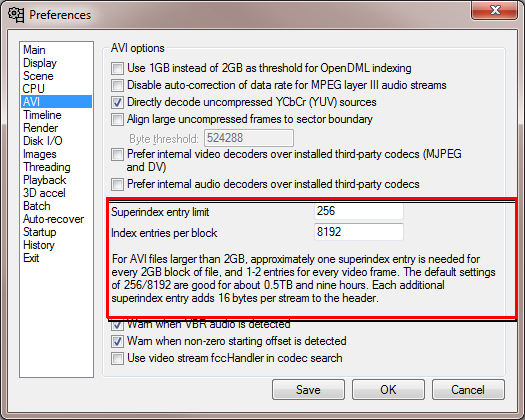 So with 2048 entries, it would be only logical to have one index per 0.5 GB ( 1/4th of 2GB), so the avi output would crash at 0.5x256 = 128 GB. I guess the fix would be to patch the source code and recompile the application. Last edited by mariush; 2nd April 2016 at 15:50. |
|
|
|
|
2nd April 2016, 12:27
|
#4 | Link |
|
HeartlessS Usurer

Join Date: Dec 2009
Location: Over the rainbow
Posts: 11,491
|
Yup, I can do a special compile for you of TWriteAVI v2.0 (which also uses Vdub v1.411 source) and you can write via eg
Code:
TWriteAVI("out.avi", Overwrite=True, FourCC="ULY0")  # Write at same time as playing clip (UT_Video)
ForceProcessAVI()                                    # Force write AVI, dont play clip until fully written
Avisource("out.avi")                                 # Load new Lossless clip
return Last                                          # Plays lossless clip after writing
Code:
class AVIIndexChainNode {
public:
	enum { ENTS=8192 };

	AVIIndexChainNode *next;

	AVIIndexEntry2 ient[ENTS];
TWriteAVI v2.0:- http://forum.doom9.org/showthread.ph...ight=TwriteAvi EDIT: Sent PM link to TWriteAVI mod, totally untested (let me know if it works without problem, and I'll make public).
__________________
I sometimes post sober. StainlessS@MediaFire ::: AND/OR ::: StainlessS@SendSpace "Some infinities are bigger than other infinities", but how many of them are infinitely bigger ??? Last edited by StainlessS; 3rd April 2016 at 03:04. |
|
|
|
|
3rd April 2016, 20:23
|
#5 | Link |
|
HeartlessS Usurer
Join Date: Dec 2009
Location: Over the rainbow
Posts: 11,491
|
Here Yup, mod of avs2avi:- http://www.mediafire.com/download/3z...d_20160403.zip
__________________
I sometimes post sober. StainlessS@MediaFire ::: AND/OR ::: StainlessS@SendSpace "Some infinities are bigger than other infinities", but how many of them are infinitely bigger ??? |
|
|
|
|
3rd April 2016, 23:00
|
#6 | Link | |
|
Registered User
Join Date: Nov 2004
Location: Poland
Posts: 2,869
|
Quote:
|
|
|
|
|
|
4th April 2016, 19:18
|
#8 | Link |
|
Registered User
Join Date: Sep 2007
Posts: 5,669
|
I quite frequently use AVI's larger than that. FFMpeg can do it from avs input
Some other options you can look at are dividing up script into parts (perhaps with some "overlap" for filtering purposes), or using stronger lossless compression to reduce filesize If the problem is with the script (MT can often cause problems, usually due to memory), consider dividing up the script into sections and lossless intermediates, or using non MT Last edited by poisondeathray; 4th April 2016 at 19:20. |
|
|
|
|
11th April 2016, 09:04
|
#11 | Link |
|
Registered User
Join Date: Feb 2003
Location: Russia, Moscow
Posts: 854
|
Hi poisondeathray!
I am try simple command Code:
ffmpeg -i test.avs -codec:v utvideo test.avi Interesting I am try encode my script using avs4x264 and avs4x265 without problem. yup. |
|
|
|
|
11th April 2016, 17:38
|
#14 | Link |
|
Registered User
Join Date: Sep 2007
Posts: 5,669
|
ut video ? Just an FYI, the ffmpeg ut video variant is slower (about 2/3) than the VFW variant for decoding speed . Something about differences optimization, instruction sets. For example, if I use it in another application like a NLE, the ffmpeg ut variant is noticably slower/sluggish
|
|
|
|
|
14th April 2016, 17:38
|
#15 | Link |
|
Registered User
Join Date: Feb 2003
Location: Russia, Moscow
Posts: 854
|
When I try convert my working script (QTGMC + nnedi3 enlargement) using ffmpeg, I do not have problem for clip 1.5 hour, but during conversion 2.5 hours clip ffmpeg crashed.
I am only have success with this big clip using encoding x264 and x265, both use interface from 32 bit avisynth to 64 bit encoder. No one 32 bit programm do not work properly (avs2avi, VirtualDub and ffmpeg). Any recommendations please. May be can organize pipe from 32 bit avisynth to 64 bit AVI writer? yup. |
|
|
|
|
14th April 2016, 20:55
|
#16 | Link | |
|
Big Bit Savings Now !
 
Join Date: Feb 2007
Location: close to the wall
Posts: 2,105
|
137,4GB... hm, 28-bit LBA limit comes into mind, but only if you have an old ATA-5 controller sitting somewhere.
External HDD possibly ? But then the system would see the first 137GB of that HDD anyway... Some older Chipsets have that limitation: InSystem ISD300A1 (USB2.0), ATA-5 brings it. Quote:
__________________
"To bypass shortcuts and find suffering...is called QUALity" (Die toten Augen von Friedrichshain) "Data reduction ? Yep, Sir. We're that issue working on. Synce invntoin uf lingöage..." |
|
|
|
|
|
14th April 2016, 21:53
|
#17 | Link | |
|
Join Date: Mar 2006
Location: Barcelona
Posts: 5,034
|
Quote:
Read the thread title and the replies before posting solutions to unrelated problems that were an issue 16 years ago. |
|
|
|
|
|
23rd April 2016, 12:26
|
#18 | Link |
|
Big Bit Savings Now !
Join Date: Feb 2007
Location: close to the wall
Posts: 2,105
|
Yes, me too tired..
__________________
"To bypass shortcuts and find suffering...is called QUALity" (Die toten Augen von Friedrichshain) "Data reduction ? Yep, Sir. We're that issue working on. Synce invntoin uf lingöage..." |
|
|
|
|
25th April 2016, 17:08
|
#19 | Link |
|
Registered User
Join Date: Feb 2003
Location: Russia, Moscow
Posts: 854
|
Hi All!
Now I am try switch from Set MT build to Avisynth+(little change script, replace MT call to SetFilterMTMode and add Prefetch), speed drop from 17 fps to 11 fps, but using Virtualdub I can save whole file, 166 GB. yup. |
|
|
|
 |
|
|


