Welcome to Doom9's Forum, THE in-place to be for everyone interested in DVD conversion. Before you start posting please read the forum rules. By posting to this forum you agree to abide by the rules. Domains: forum.doom9.org / forum.doom9.net / forum.doom9.se |
 27th November 2011, 02:37
|
#1 | Link |
|
Registered User
Join Date: Nov 2011
Posts: 37
|
Hi! Noob trying to clean up animation sources
Hi everybody! After being disappointed for a while at how badly produced some animation DVDs are, I gave up watching them on HD screens (which amplify the defects) until I found examples on how Avisynth can be used to clean up such sources. I am good with computers but nowhere being a programmer so I started using Handbrake earlier this year (I use mac so it was easier to set up too) and learned the basics of containers, various encoding methods, interlacing, etc and started ripping my DVDs. I eventually found Handbrake to be limited in not providing solutions to haloing, dot crawl, and other problems that Avisynth filters can solve. After a ton of time setting up Parallels, XP SP3, Avisynth 2.5.8 MT and Megui, I started working on a short ten-minute Spongebob episode to see what I could do. After a lot of trial and error (and crashing) I ended up with this script to deal with the telecininig and haloing:
SetMemorymax(512) SetMTMode(mode=2, threads=0) Import("C:\Program Files\AviSynth 2.5\plugins\aaa.avs") DGDecode_MPEG2Source("\\psf\home\desktop\D2V Project Files\Spongebob_4_Fear_of_a_Krabby_Patty.d2v") global MeGUI_darx = 120 global MeGUI_dary = 91 AnimeIVTC(mode=1) crop(4, 0, -4, 0) DeHalo_alpha(rx=1.5, ry=1.5, darkstr=1.5, brightstr=1.5, lowsens=80, highsens=20) vmtoon(sharpen=false,thinning=0,strength=50) aaa() Here is before:  Here is after: 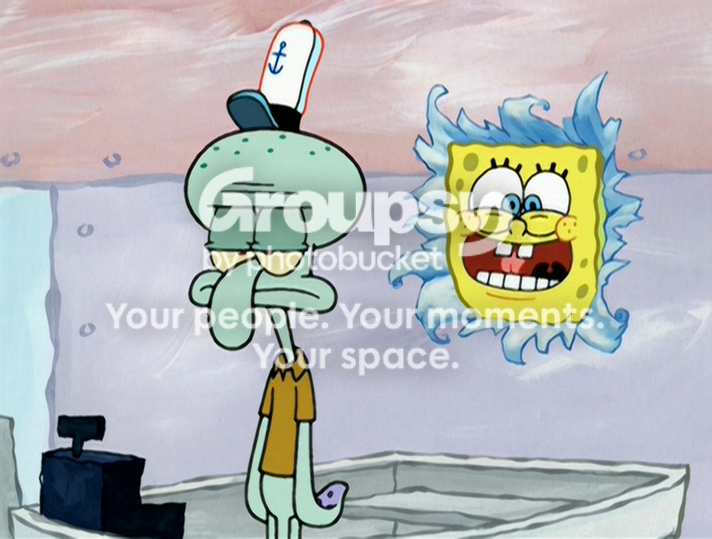 Now I think it does ok at getting rid of the halos outside of the characters however the ones around their eyes, Spongebob's teeth, and Squidward's brow lines never got completely removed and are still distracting when blown up. It did blur the source a bit and dilute the solidness of the outlines, which is to expected, but enabling the sharpening aspect of vmtoon reintroduced slight haloing and halved the encoding speed so I didn't opt for it. So before I encode 100+ episodes using this script as the basis, I'd like to know if any pro Avisynth users here know of any way I can either make the script more efficient to make encoding faster (~4.5 fps encoding high-profile 4.1 x264 on 4 cores lol) or that can fix the halos while keeping the lines as dark as the source (like using better settings or similar filters). A lot of the black outlines (on the source) have speckles which make them look kinda dashed, for lack of a better explanation (see the bottom lines around Spongebob's eyes in the original pic) so I was hoping there was a line darkener or settings that could smooth those out too. Any input is appreciated and thanks for having such a great forum! |

|

|
 |
|
|


