Welcome to Doom9's Forum, THE in-place to be for everyone interested in DVD conversion. Before you start posting please read the forum rules. By posting to this forum you agree to abide by the rules. |
 13th March 2005, 16:06
|
#321 | Link |
|
Be Brave!

Join Date: Dec 2004
Posts: 1,101
|
 I don't know what's up, but I created a 6 mono wav from an mp3 file with BeLight v0.22 Alpha 2, then I closed BeLight, and re-opened it, and this is the error message I get. After I click OK I can use BeLight... weird 
Last edited by Elias; 13th March 2005 at 16:11. |

|

|
|
13th March 2005, 18:36
|
#324 | Link |
|
Registered User

Join Date: May 2002
Location: Spain (Madrid)
Posts: 155
|
Found some bugs
In "Command Line editor". - When opening file "F:\_TMP_\Heavenly Creatures.ac3" the resulting command line in the "command line editor window" is BeSweet.exe -core( -input "F:\_TMP_\F:\_TMP_\Heavenly Creatures.ac3" -output "F:\_TMP_\F:\_TMP_\Heavenly Creatures.ogg" -logfile "F:\_TMP_\F:\_TMP_\Heavenly Creatures.log" ) -azid( -c normal ) -ota( -hybridgain ) -ogg( -q 0.400 ) If i press "Run" it works perfectly and get the file from the correct path. It just shows it incorrectly. It is solved when unchecking the audio track and opening again the "Command line editor". From that moment is always correct (even if you check and uncheck the audio track mny times). Another way to solve it is to "start the process", abort it and openig the "Command line editor" again. - If you close the file (clear list) and then open the "Command line editor", there is still the command line for the closed file. The "Command line editor" has to be closed and opened again to clear the trace of the closed file. (A good thing is that if you press "Run" with the closed file command line, a window appears telling you that there is no input file). - A cosmetic issue. In the context menu in the files list, i think is better not to show cheching marks when pressing the different options, because you can press the same option two consecutive times and when you press a checked option you feel like you are unchecking it, not running it. It is all . I hope it is useful.
|
|
|
|
|
13th March 2005, 18:50
|
#325 | Link |
|
Registered User
Join Date: May 2002
Location: Spain (Madrid)
Posts: 155
|
More about the "path" issue.
If the first opened file is opened in a "Drag and Drop" way, it will be correctly displayed. Any other file opened in the way "Drag and Drop" next, will be correctly displayed. If then a file is opened by "File -> Open" it will be incorrectly displayed and any other file will be incorrectly displayed if opened in any way. If the first file is opened by "File -> Open" it will be incorrectly displayed and the next files also will be displayed incorrectly any way they were opened. If a file is correctly displayed ("F:\_TMP_\Heavenly Creatures.ac3") and then you uncheck the file, the path information ("F:\_TMP_\") is erased from the command line. And when pressing "Run", BeLight starts and ends and does nothing. [EDIT] BeLight does nothing with the first opened files in the "Drag and Drop" way (even if you don't uncheck it). [/EDIT] I think one of the bugs is when unchecking for the first time the files. Regards Last edited by Palikrovol; 13th March 2005 at 19:31. |
|
|
|
|
13th March 2005, 19:13
|
#326 | Link | |
|
Swallowed in the Sea

Join Date: Oct 2002
Location: Aix-en-Provence, France
Posts: 5,191
|
Quote:
|
|
|
|
|
|
13th March 2005, 19:15
|
#327 | Link | |
|
Be Brave!
Join Date: Dec 2004
Posts: 1,101
|
Quote:
 Testing some functions, checking if they worked properly. Testing some functions, checking if they worked properly.
|
|
|
|
|
|
13th March 2005, 19:18
|
#328 | Link | ||
|
Swallowed in the Sea
Join Date: Oct 2002
Location: Aix-en-Provence, France
Posts: 5,191
|
Quote:
Quote:
|
||
|
|
|
|
13th March 2005, 20:01
|
#330 | Link |
|
Registered User
Join Date: May 2002
Location: Spain (Madrid)
Posts: 155
|
Some things i forgot.
- In the files list, if the file's name is too long, it is not displayed complete (appears truncated). - The options '-L -3db' (-azid) are not displayed in the "Command Line", but are checked in the advanced options. I have to unckeck and recheck this options in the advanced options to make them appear in the command line. |
|
|
|
|
13th March 2005, 20:13
|
#331 | Link |
|
... space nerd ...

Join Date: Feb 2004
Location: Terra
Posts: 163
|
Kurtnoise13 first of all thx for this great GUI.
1. could you add a drag&drop feature to BeLight (speeds up things) Belight 0.21 final: 2. when picking a wav as input and choosing 16bit Stereo Wave as output kind of adds useless switches [ -azid( -s stereo -L -3db )] 3. when inputting a .mux list and output is WAV there are also some "useless" azid switches: 5.1 WAVE: -azid( -c normal ) Stereo WAVE: -azid( -s stereo -c normal -L -3db ) 16bit (Six) Mono WAVEs: -azid( -c normal ) 32bit (Six) Mono WAVEs: -azid( -c normal ) Last edited by planet1; 13th March 2005 at 20:15. |
|
|
|
|
13th March 2005, 20:43
|
#332 | Link | ||
|
Swallowed in the Sea
Join Date: Oct 2002
Location: Aix-en-Provence, France
Posts: 5,191
|
Quote:
 Quote:
@Palikrovol : yeah, I saw the problem. Thanks for the bugs report. |
||
|
|
|
|
16th March 2005, 01:05
|
#333 | Link |
|
Swallowed in the Sea
Join Date: Oct 2002
Location: Aix-en-Provence, France
Posts: 5,191
|
BeLight 0.22 beta 1 released
The 0.22 beta 1 is out.
changelog: * Added some other input formats (mpa, mp2, mp3, vorbis, wav[**]) compatible with the Batch Mode. * Bugs fixed concerning Opening & Checking input files. * Edit window for BeSweet Command Line is now updated then we decide to change settings. * Several internal tweakings. [**]only stereo files for the moment. In addition, a screenshot to show you the transcoding CD-Audio wav files to vorbis with BeSweet by example.... 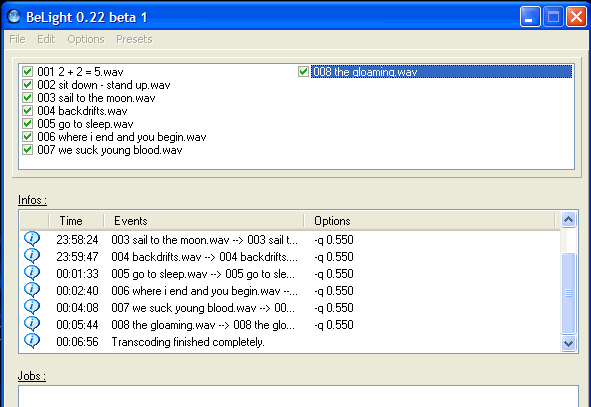
|
|
|
|
|
17th March 2005, 09:23
|
#338 | Link | |
|
Be Brave!
Join Date: Dec 2004
Posts: 1,101
|
Quote:
I don't know what soundtouch is
Last edited by Elias; 17th March 2005 at 09:27. |
|
|
|
|
|
17th March 2005, 09:25
|
#339 | Link |
|
Pig on the wing

Join Date: Mar 2002
Location: Finland
Posts: 5,730
|
By the way, the SoundTouch library has been updated some time ago, it fixes a nasty rounding bug which affected framerate conversions. If someone could compile it for using with BeSweet, it would be great
__________________
And if the band you're in starts playing different tunes I'll see you on the dark side of the Moon... |
|
|
|
|
17th March 2005, 09:50
|
#340 | Link | ||||
|
Swallowed in the Sea
Join Date: Oct 2002
Location: Aix-en-Provence, France
Posts: 5,191
|
Quote:
Quote:
Quote:
Quote:
|
||||
|
|
|
 |
| Thread Tools | Search this Thread |
| Display Modes | |
|
|


 Linear Mode

